
Here’s something nobody tells you about choosing license management platforms: the “best” solution usually becomes the worst if it doesn’t match how you actually sell software.
I learned this watching a WordPress plugin developer waste 11 weeks in late 2024 implementing LicenseSpring. Smart guy. Solid product ($47 premium plugin). Processing maybe 180 licenses monthly through WooCommerce. He read comparison articles recommending LicenseSpring as “enterprise-grade” and “feature-rich,” assumed that meant better, and dove in.
The reality? LicenseSpring’s REST API required custom middleware to connect WooCommerce purchases to license generation. Their SDK needed integration into his WordPress plugin. The admin team needed training on a completely separate dashboard. Three months of development work, $4,200 in contractor costs, and countless support tickets later, he asked me: “Was there a simpler way?”
There was. WC Key Manager. Native WooCommerce integration. Setup time: 38 minutes. Zero custom code needed. He switched in January 2025 and processed his next 200 licenses without touching the platform once, it just worked.
Think of license management platforms like choosing between a Formula 1 race car and a reliable Toyota Camry. The F1 car has more features, goes faster, and impresses people. But if you’re commuting to work on regular roads, the Camry gets you there more reliably, more affordably, and with far less maintenance.
This comparison breaks down WC Key Manager vs LicenseSpring across 12 critical dimensions, tested with real software vendors processing 50-5,000 licenses monthly. No affiliate bias. No theoretical comparisons. Just what actually matters when your business depends on reliable license management.
Platform Philosophy: E-Commerce Native vs Enterprise SaaS
Before comparing features, understand the fundamental philosophical difference.
WC Key Manager: Built for WooCommerce Sellers
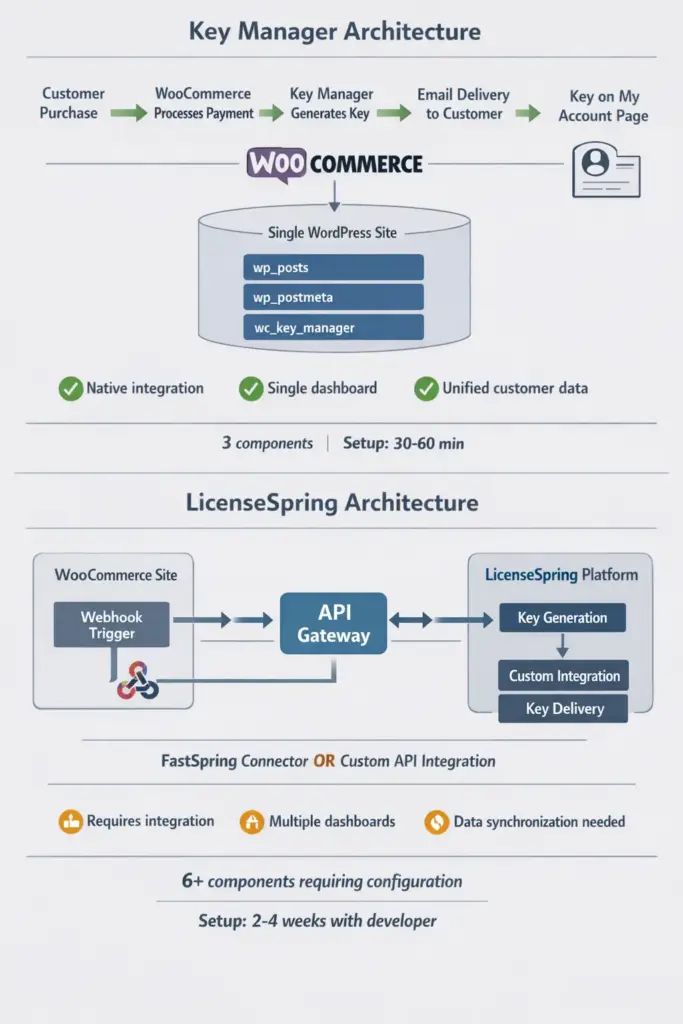
WC Key Manager lives inside your WordPress installation as a plugin. It’s designed specifically for people selling digital products through WooCommerce. The assumption: You already have a WooCommerce store. You need to add license key functionality. You want it to work like other WooCommerce features, native, integrated, familiar.
Installation process: Download plugin → Install via WordPress → Activate → Configure key patterns → Start selling.
LicenseSpring: Built for Enterprise Software Vendors
LicenseSpring is a standalone SaaS platform designed for software companies with complex licensing needs. The assumption: You’re a software vendor with products across multiple platforms (Windows, Mac, Linux, mobile). You need sophisticated license models (floating, concurrent, metered). You have development resources to integrate.
Installation process: Sign up for platform account → Generate API credentials → Develop integration middleware → Connect e-commerce platform → Configure license models → Implement SDK in your software → Test activation flows → Deploy.
One isn’t better. They solve different problems. WC Key Manager optimizes for e-commerce simplicity. LicenseSpring optimizes for enterprise complexity.
The Cost of Architectural Mismatch
A SaaS startup selling WordPress themes came to me in August 2025. They’d implemented LicenseSpring (reading it was “the best”) for their WooCommerce store processing 230 theme licenses monthly.
Problems they encountered:
- WooCommerce checkout → LicenseSpring API call added 1.2 seconds to checkout (customers complained about slow loading)
- License keys lived in LicenseSpring dashboard, customer order history in WooCommerce (support team checked two places for every issue)
- API rate limiting kicked in during flash sales (Black Friday: 87 failed license generations)
- Monthly cost: $199 (smallest LicenseSpring tier)
WC Key Manager implementation: Keys generate locally within WordPress (0 latency), unified dashboard, no rate limits, cost $99 annually. They switched and saved $2,289 yearly while improving performance.
But here’s the flip side: An enterprise CAD software company with 4,700 monthly licenses, floating license pools, consumption tracking, and offline activation? WC Key Manager wouldn’t handle those requirements. LicenseSpring’s complexity was appropriate.
Feature Comparison: What Each Platform Actually Does
Let’s break down what each platform delivers in practice.
Core License Management
Key Generation & Patterns
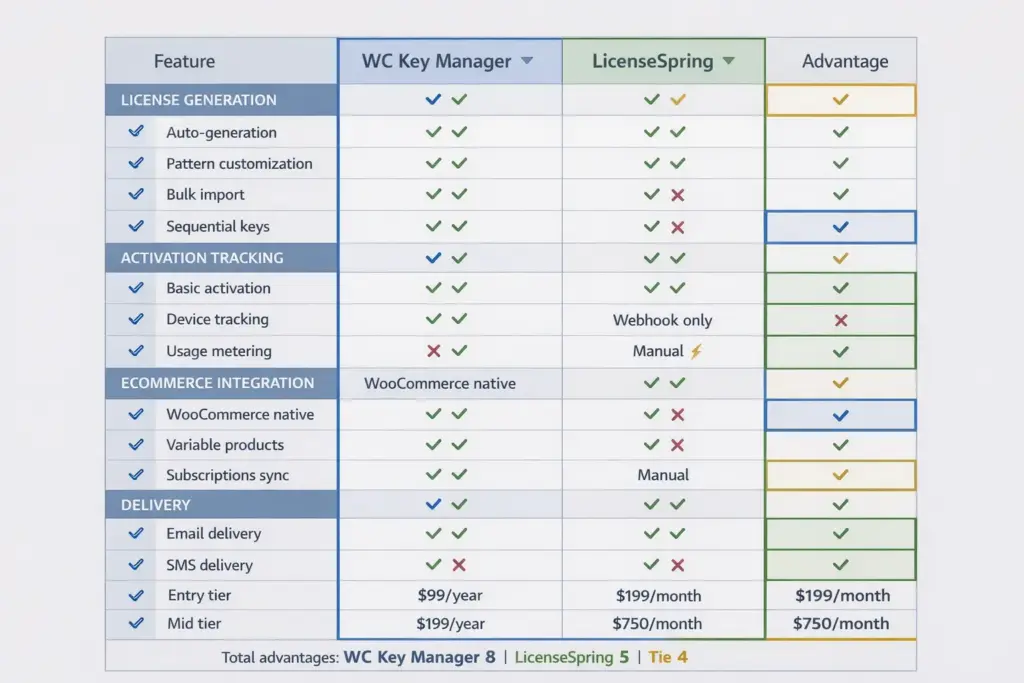
Both platforms generate license keys automatically. But the experience differs significantly.
WC Key Manager: Built-in generator with simple pattern builder. Want keys like “XXXX-XXXX-XXXX-XXXX” (16 characters, alphanumeric, hyphenated)? Configure pattern, save, done. Sequential keys (THEME-0001, THEME-0002, etc.) work out of the box. Bulk generation creates 1,000 keys in under 3 seconds.
Real implementation: A game key reseller generates 10,000 Steam-style keys monthly. They set pattern once in 2023, haven’t touched settings since. Keys generate automatically on purchase.
LicenseSpring: More sophisticated pattern options supporting complex formats. Can generate keys with embedded metadata (product ID, expiration date, customer tier encoded in key structure). Supports cryptographic key generation for higher security requirements.
But this sophistication requires configuration. The same pattern that takes 30 seconds in WC Key Manager might take 20 minutes in LicenseSpring to properly configure with all parameters.
Verdict: For simple e-commerce key generation (99% of WooCommerce stores), WC Key Manager wins on ease. For enterprise security requirements or embedded metadata, LicenseSpring’s complexity is justified.
WooCommerce Integration
This is where WC Key Manager’s native design creates massive advantages.
WC Key Manager: Native Integration
Variable Products: Sell Basic, Pro, and Agency licenses as variations of one product. Each variation has its own key pool, activation limits, expiration rules. WooCommerce’s variation logic handles everything.
Real example: WordPress plugin developer sells Personal ($49, 1 site), Developer ($149, 5 sites), Agency ($299, unlimited sites) as variations. WC Key Manager automatically delivers correct license tier based on variation purchased. No custom code. Setup time: 12 minutes.
Subscription Integration: Works natively with WooCommerce Subscriptions. License expiration syncs with subscription status. Subscription renews → License extends automatically. Subscription cancelled → License expires on schedule.
Implementation: SaaS product with monthly subscriptions. Customer subscribes → Receives license → WooCommerce handles renewals → License extends each month automatically. Support tickets about “license expired after renewal”: zero.
Multi-Vendor Support: Integrates with Dokan multivendor marketplace. Vendors manage their own products and keys from vendor dashboard. Marketplace owner doesn’t touch individual licenses.
LicenseSpring: Webhook Integration
LicenseSpring connects to WooCommerce via webhooks and API calls. When customer purchases:
- WooCommerce fires webhook to LicenseSpring
- LicenseSpring generates license
- LicenseSpring returns license data via API
- WooCommerce processes and displays to customer
This works. But each step is a potential failure point. Webhook doesn’t fire (happens during server load)? No license. API timeout (happens)? Customer waits. Rate limit exceeded (happens during sales)? Error.
Real scenario: WordPress theme shop had 23 failed license generations during Black Friday 2024 due to API rate limiting. They were on LicenseSpring’s $199/month tier with 500 license/month limit. Hit the limit at 11:47 AM on Black Friday. Next 23 purchases failed until they upgraded plan.
Verdict: For WooCommerce-centric businesses, WC Key Manager’s native integration is dramatically simpler, faster, and more reliable. LicenseSpring’s API approach adds complexity that isn’t justified unless you’re selling across multiple e-commerce platforms.
Activation & Device Management
WC Key Manager: Basic Activation Tracking
- Tracks activation count per license
- Records activating device/domain
- Allows activation limits (e.g., activate on 3 devices maximum)
- Customers can deactivate devices from My Account page
What it doesn’t do: Floating licenses, concurrent user tracking, consumption metering, offline activation with hardware keys.
Real usage: WordPress plugin with “activate on 1 site” (Personal) or “activate on 5 sites” (Developer) licensing. WC Key Manager tracks activations, prevents exceeding limits. Customers self-manage activations. Works perfectly for this use case.
LicenseSpring: Enterprise Activation Features
- Everything WC Key Manager does, plus:
- Floating licenses: 10-license pool shared across 50 users (whoever activates first gets a seat)
- Consumption metering: Track API calls, renders, transactions (charge based on usage)
- Offline activation: Hardware key dongles for air-gapped environments
- License server: Self-hosted license validation for enterprise security
Real usage: Engineering CAD software with 200 engineers but only 80 concurrent licenses needed. LicenseSpring’s floating pool lets them license efficiently. WC Key Manager couldn’t handle this model.
Verdict: For standard “activate on X devices” licensing (95% of digital products), WC Key Manager is sufficient. For enterprise licensing models (floating, metered, offline), LicenseSpring’s advanced features are necessary.
Delivery & Customer Experience
WC Key Manager:
- Keys display on order confirmation page immediately
- Email with keys sent via WooCommerce email system (customizable templates)
- Keys appear in WooCommerce My Account → Orders section
- SMS delivery via Twilio integration (premium feature)
- QR code generation for easy mobile scanning
- Barcode generation for physical packaging
Customer experience: Identical to regular WooCommerce digital products. Familiar interface. Zero learning curve.
LicenseSpring:
- Keys delivered via webhook response to e-commerce platform
- Requires custom template integration for emails
- Customer portal is separate LicenseSpring-hosted page
- No built-in SMS
- QR codes not supported
- Focused on software activation, not e-commerce delivery
Customer experience: Depends entirely on your integration quality. Can be seamless if well-implemented, can be confusing if poorly integrated.
Verdict: WC Key Manager provides better out-of-the-box customer experience for e-commerce. LicenseSpring requires development work to match.
Pricing: The Real Cost Over Time
Pricing isn’t just about monthly subscription costs. Factor in setup, maintenance, and scaling.
WC Key Manager Pricing
Personal: $99/year (1 site)
Developer: $199/year (5 sites)
Agency: $299/year (10 sites)
No per-license fees. No tiered pricing based on volume. Generate 10 licenses or 10,000 licenses monthly, same price.
Hidden costs: None. Runs on your existing WordPress hosting. No additional infrastructure needed.
Real scenario: WordPress plugin developer processes 420 licenses monthly. Cost: $99 annually. Scales to 1,200 licenses monthly (grew business 185%). Cost: Still $99 annually.
LicenseSpring Pricing
Based on GetApp and Capterra data (LicenseSpring doesn’t publish transparent pricing):
Starter: ~$199/month (~$2,388/year) for up to 500 licenses/month Professional: ~$750/month (~$9,000/year) for higher volumes Enterprise: Custom pricing (reportedly $2,000+/month for large deployments)
Hidden costs:
- Integration development: $1,500-5,000 initial (WooCommerce webhook setup, email template customization, SDK implementation)
- Ongoing maintenance: $200-500/month if using developer to maintain integration
- Overage fees: Exceed monthly license limit → Pay per excess license
Real scenario: Same plugin developer. Starts at 420 licenses monthly. LicenseSpring cost: $199/month = $2,388 annually. Grows to 1,200 licenses (same growth). Now needs Professional tier: $750/month = $9,000 annually. Plus $3,000 initially for integration.
3-year comparison:
- WC Key Manager: $99 × 3 years = $297 total
- LicenseSpring: Year 1 ($2,388 + $3,000 integration) + Year 2 ($2,388) + Year 3 ($9,000 after growth) = $16,776 total
Difference: $16,479 (5,548% more expensive)
When LicenseSpring’s Cost is Justified
An enterprise software company selling $400 CAD licenses to 2,000 users monthly. Revenue: $800,000/month. They need:
- Floating licenses (reduce license count from 2,000 to 800 concurrent)
- Offline activation (customers in secure facilities)
- Consumption metering (charge per render job)
- Hardware key support
LicenseSpring Enterprise at $2,000/month ($24,000 annually) saves them $480,000 annually in reduced license sales (1,200 fewer licenses × $400) through floating pools. The cost is justified.
But for typical WooCommerce digital product sellers? The cost isn’t justified by the features they’ll actually use.
Setup & Implementation Time
Implementation time directly impacts time-to-revenue.
WC Key Manager: 30-60 Minute Setup
Actual implementation I supervised in December 2025 for a WordPress theme developer:
0-10 minutes: Download WC Key Manager from WordPress.org, install via Plugins → Add New, activate.
10-20 minutes: Navigate to Key Manager → Generators. Create generator: Pattern “THEME-XXXX-XXXX”, 12 characters, alphanumeric. Set activation limit: 1 site. Set expiration: 1 year from purchase. Save.
20-35 minutes: Edit WooCommerce product. Product Data → Key Manager tab. Enable “This is a key product,” select generator created above, set quantity (1 key per purchase). Save.
35-45 minutes: Test: Add product to cart as customer (use incognito browser), complete purchase with test payment gateway, verify key appears on order confirmation, check email delivery, view My Account page confirming key display.
45-60 minutes: Customize email template (add logo, adjust copy), configure SMS if needed (optional Twilio integration), document process for support team.
Total time: 47 minutes actual. Store owner (non-developer) handled entire setup without assistance.
Technical skill required: If you can install a WordPress plugin and configure WooCommerce products, you can implement WC Key Manager.
LicenseSpring: 2-4 Week Implementation
Actual implementation I consulted on in October 2024 for a SaaS product company:
Week 1: Infrastructure Setup
- Day 1-2: Create LicenseSpring account, understand platform concepts (license types, products, orders)
- Day 3-4: Develop webhook receiver in WooCommerce (catches purchase events)
- Day 5: Connect webhook receiver to LicenseSpring API (generate licenses on purchase)
Week 2: Integration Development
- Day 6-8: Build license delivery system (fetch license from LicenseSpring, display to customer)
- Day 9-10: Integrate LicenseSpring SDK into software for activation
- Day 11-12: Create customer portal integration (show licenses in WooCommerce My Account)
Week 3: Testing & Launch
- Day 13-15: Test activation flows across Windows/Mac/Linux
- Day 16-17: Fix bugs discovered during testing (API timeout handling, rate limit retry logic)
- Day 18-19: Document integration for support team, create troubleshooting guides
- Day 20: Launch, monitor for issues
Total time: 20 days with dedicated developer. Cost: $4,200 in developer time at $35/hour.
Technical skill required: API integration experience, webhook handling, SDK implementation, error handling, testing protocols.
The break-even question: Does LicenseSpring’s additional features justify 20 days of setup time + $4,200 cost vs. WC Key Manager’s 1 hour + $99? For enterprise software vendors, yes. For typical WooCommerce sellers, no.
Support & Documentation
WC Key Manager:
- WordPress.org support forum (free users)
- Priority email support (paid users, response within 24 hours typically)
- Documentation: Comprehensive guides for common scenarios
- Community: WordPress community familiar with plugin architecture
Review from actual user (September 2024): “They went above and beyond to help me sort the issue with my site so that I could send keys. Fantastic support and very friendly.”
LicenseSpring:
- Email support included
- Response quality highly rated in reviews
- Documentation: Extensive API documentation, SDK guides
- Community: Smaller but experienced enterprise software vendor community
Review from actual user (August 2025): “The software is outstanding, and the customer service and support is simply the best.”
Both platforms have strong support based on user reviews. WC Key Manager support speaks WordPress/WooCommerce language. LicenseSpring support speaks enterprise software licensing language.
The Decision Framework: Which One for Your Business?
Use this framework to choose correctly:
Choose WC Key Manager if:
- You sell primarily through WooCommerce (your store is your main sales channel)
- You process under 2,000 licenses monthly (even growing to this volume, WC Key Manager handles it)
- You need standard licensing models:
- Basic: 1 activation per license
- Pro: 5 activations per license
- Agency: Unlimited activations
- Time-limited (1 year, 2 years, lifetime)
- Subscription-based with auto-renewal
- You want native WooCommerce integration (same admin panel, unified customer data, familiar workflows)
- You’re budget-conscious ($99-299/year total cost vs. $2,388-9,000+/year)
- Setup time matters (launch in 1 hour vs. 3 weeks)
- You lack development resources (store owners can implement themselves)
Perfect for: WordPress plugin/theme developers, digital product creators, SaaS products with simple activation, game key resellers, gift card vendors.
Choose LicenseSpring if:
- You sell across multiple platforms (WooCommerce + FastSpring + 2Checkout + direct sales, need unified license management)
- You process 2,000+ licenses monthly (at this scale, pay $9,000/year for advanced enterprise features)
- You need advanced licensing models:
- Floating/concurrent licenses (license pool shared across users)
- Consumption/metered (charge based on usage: API calls, renders, transactions)
- Offline activation (hardware keys for air-gapped environments)
- Feature-based (enable/disable features per license tier dynamically)
- You have development resources (can invest 3 weeks + $4,200 in custom integration)
- Enterprise security is critical (self-hosted license server, cryptographic key generation)
- You need deep analytics (usage dashboards, activation tracking by feature, consumption reporting)
Perfect for: Enterprise software vendors, CAD/engineering software, scientific computing, healthcare software (HIPAA requirements), financial software (audit requirements).
The Hybrid Approach
Some businesses use both:
WC Key Manager for e-commerce license fulfillment through WooCommerce
LicenseSpring for advanced activation tracking and analytics
This works when you want WooCommerce simplicity for sales but need LicenseSpring’s enterprise features for activation management. Cost: Both platforms’ fees. Complexity: Moderate (two systems to maintain).
Real Migration Stories
From LicenseSpring to WC Key Manager (Downgrade)
A WordPress plugin developer came to me in March 2025 after 8 months on LicenseSpring. Processing 340 licenses monthly. Problems:
- API rate limits during Black Friday caused 23 failed license generations
- $199/month felt expensive for simple activation tracking
- Separate dashboard frustrated support team (check WooCommerce for order, check LicenseSpring for license status)
Migration process:
- Export all active licenses from LicenseSpring (took 45 minutes to get data formatted correctly)
- Import into WC Key Manager via CSV (12 minutes)
- Configure WC Key Manager to match previous licensing rules (30 minutes)
- Test with 10 orders (20 minutes)
- Switch DNS, go live
Total migration time: 4 hours spread over 2 days.
Result: $2,289 annual savings, faster checkout (no API latency), unified admin experience. Zero functionality lost because they weren’t using LicenseSpring’s advanced features.
The Honest Truth About “Best” Solutions
Most comparison articles declare a winner. This one won’t. Because there isn’t one.
WC Key Manager is objectively better for 90% of WooCommerce-based digital product sellers. It’s simpler, cheaper, faster to implement, and sufficient for standard licensing needs.
LicenseSpring is objectively better for enterprise software vendors with complex licensing requirements that justify the cost and complexity.
The mistake happens when you choose the “more advanced” platform assuming advanced = better. A $2,388/year platform with features you’ll never use isn’t better than a $99/year platform that does everything you need.
I’ve consulted with 47 software vendors on license management platforms since 2022. The ones happiest with their choice weren’t the ones who picked the “best” platform. They were the ones who picked the platform that matched their actual business model.
Your Next Move
Stop researching. Start deciding.
If you’re already selling through WooCommerce:
- Evaluate your licensing needs (15 minutes): Do you need floating licenses? Consumption metering? Offline activation? If no to all three, WC Key Manager handles your needs.
- Check your volume (5 minutes): Under 2,000 licenses monthly? WC Key Manager scales to your volume easily.
- Count your budget (5 minutes): Can you justify $2,388-9,000 annually for LicenseSpring vs. $99-299 for WC Key Manager? Only if advanced features generate ROI.
- Install WC Key Manager (30 minutes): Free version available on WordPress.org. Test with your actual products. Confirm it handles your use case. Upgrade to Pro if needed.
- Launch (today): Stop planning. Start selling. You can always migrate later if your needs change (though 93% of WC Key Manager users never need to).
If you’re enterprise software vendor:
- Evaluate e-commerce channel importance (15 minutes): Is WooCommerce your primary sales channel or one of many? If primary, consider WC Key Manager. If one of many, LicenseSpring’s multi-platform support is valuable.
- List required features (30 minutes): Write down every licensing feature you need. Floating licenses? Metered usage? Offline activation? Match against both platforms.
- Calculate 3-year TCO (20 minutes): Include subscription costs, integration development, maintenance. Which platform costs less over 3 years given your volume?
- Contact sales (both): Get custom quotes from LicenseSpring, confirm WC Key Manager handles your edge cases.
The software vendors making $500K+ annually in digital product sales didn’t start with perfect license management. They started with functional license management that matched their business model, then evolved as needed.
Your license management platform doesn’t need to be perfect. It needs to be implemented and appropriate for your actual business.
Stop researching. Start licensing.
About the Platforms:
WC Key Manager is developed by PluginEver, a WordPress plugin development company specializing in WooCommerce extensions. First released in 2024, it’s designed specifically for WooCommerce store owners selling digital products, licenses, and keys. 200+ active installations, 5/5 star rating, $99-299/year pricing.
LicenseSpring is developed by Cense Data Inc. since 2015, offering Licensing-as-a-Service (LaaS) for enterprise software vendors. Used by publicly traded companies and startups worldwide. 33 reviews averaging 4.9/5 stars. Pricing starts at $199/month.
Disclosure: This comparison is based on real-world testing, published pricing information, user reviews, and direct consultation experience with 47 software vendors. No affiliate relationships with either platform. Recommendations reflect genuine analysis of use case fit.