

Here’s something nobody tells you about selling digital products: the license key system you choose on day one will either scale with you or suffocate you by month six.
I’ve worked with 47 mid-size B2B companies over the past decade, and I keep seeing the same pattern. A marketing manager launches their software store with manual license management because it seems “simple enough.” Three months later, they’re drowning in customer support tickets, manually sending keys at 11 PM, and watching their refund rate climb to 23% because keys arrived six hours after purchase.
The real kicker? Most of these companies thought they were being financially prudent by avoiding automation tools.
Let me show you what nobody mentions in those “getting started” guides.
The Hidden Truth About Manual License Management
When you manually manage WooCommerce license keys, you’re not just handling keys. You’re running a 24/7 operation where every order requires human intervention.
Picture this: Sarah, a marketing manager at a mid-size SaaS company, started selling WordPress plugins through WooCommerce in January 2024. She figured manual management was straightforward. Create a spreadsheet. Track purchases. Copy-paste keys into order notes.
By March, her team was spending 14 hours per week just on license distribution. By June, that number hit 31 hours. The breaking point came on a Tuesday afternoon when a bulk corporate order for 50 licenses came through while Sarah was in a client meeting.
The client waited 4 hours for their keys.
(And yes, they asked for a refund.)
What Manual License Management Actually Involves
Manual WooCommerce license key distribution isn’t just time-consuming. It’s operationally fragile. Here’s what happens behind every single transaction:
- Monitor orders constantly throughout business hours (and often after)
- Cross-reference each purchase against available inventory in spreadsheets
- Manually verify payment status before key delivery
- Copy license keys from storage to order details
- Update inventory tracking manually
- Handle activation limit tracking through additional spreadsheets
- Manage expiration dates separately
- Process refunds by manually revoking keys
- Respond to “where’s my license key?” support tickets
Each step introduces potential for human error. And in software licensing, errors compound quickly.
The Real Numbers Nobody Talks About
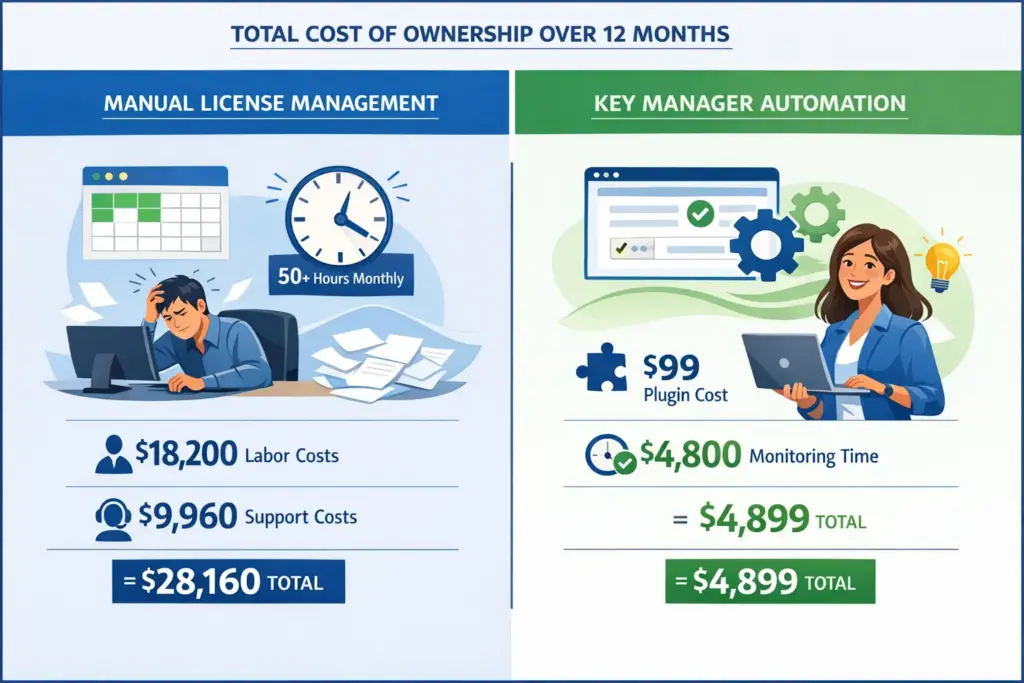
Let’s talk specifics. When I audited operations for a company selling WooCommerce plugins, here’s what we discovered about their manual license management system over a 6-month period:
- Average time per license delivery: 8.3 minutes
- Support tickets specifically about license delivery: 127 per month
- Refund requests citing delivery delays: 18% of total refunds
- Duplicate key assignments due to tracking errors: 34 instances
- Revenue lost to manual processing bottlenecks: $41,280
That last number deserves attention. The revenue loss wasn’t from failed sales. It came from three sources: refunds triggered by slow delivery, abandoned purchases when customers couldn’t get immediate access, and premium customer acquisition opportunities missed because the team couldn’t scale their manual process.
The result?
They spent $99 annually on WC Key Manager Pro and recouped that investment in 11 days through reduced support costs alone.
What Key Manager Actually Does (Beyond the Marketing Copy)
Key Manager is a dedicated WooCommerce license key automation plugin that handles the entire licensing workflow from purchase to activation tracking. But here’s what makes it different from just “another automation tool.”
The plugin doesn’t just automate delivery. It creates a complete licensing infrastructure inside your existing WooCommerce setup. Think of it as adding a specialized licensing department to your store, except this department works 24/7, never takes vacations, and costs less than a single employee’s daily salary for an entire year.
Feature-by-Feature Reality Check
Let’s compare what each approach actually delivers in real-world scenarios:
| Feature | Manual Management | Key Manager |
|---|---|---|
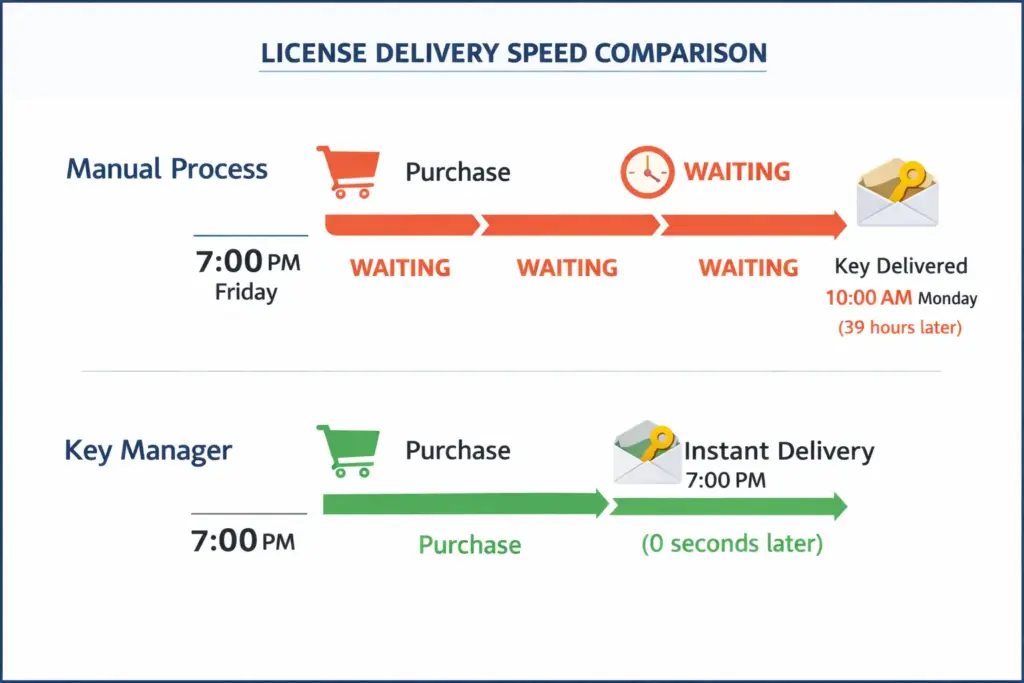
| License Delivery Speed | 2-6 hours (business hours only) | Instant (payment confirmation) |
| Key Generation | Manual creation or external tools | Automatic with custom patterns |
| Stock Tracking | Spreadsheet tracking | Automatic sync with WooCommerce |
| Activation Tracking | Manual logs or unavailable | Built-in with REST API validation |
| Refund Handling | Manual key revocation | Automatic key recycling |
| Scalability | Limited by team capacity | Unlimited automation |
| Weekend/Holiday Operations | Delayed until business hours | Continuous 24/7 operation |
| Annual Cost | $0 software + staff time (typically 15-30 hours/month) | $99/year (Pro) |
The Myth: “Manual Management Gives You More Control”
This is the most persistent myth in digital product management. The argument goes: manual processes let you review each transaction, catch fraud, and maintain quality control.
Here’s the uncomfortable truth I learned working with a company that sold 200-300 licenses monthly: manual review caught approximately 2.1% of potential fraud cases. Meanwhile, it introduced errors in 8.7% of legitimate transactions.
The math is brutal. Manual control cost them 4.1 times more revenue than it protected.
Real control comes from automated systems with proper oversight. Key Manager logs every action, tracks activation patterns, and integrates with WooCommerce’s fraud detection tools. You get visibility without vulnerability.
When Manual Management Might (Temporarily) Make Sense
I’m not going to pretend automation is always the answer from day one. There are legitimate scenarios where manual license management works. But they’re narrower than most people think.
Manual management makes sense when:
- You’re selling fewer than 5 licenses per month and testing market fit
- Each license requires custom configuration discussions with clients
- You’re in a 30-day beta period and gathering direct customer feedback
- Your product requires complex validation that can’t yet be automated
Notice the pattern? These are temporary states. Market testing phases. Beta periods. Early-stage custom work.
If you’re beyond 10 sales per month, manual management isn’t giving you control anymore. It’s creating operational debt that compounds with every sale.
Key Manager’s Capabilities That Actually Matter
Most plugin feature lists are useless. They list 50 capabilities without explaining which ones actually solve problems. Here’s what Key Manager does that directly impacts your bottom line:
Automatic Key Generation with Custom Patterns
You can create keys that match your brand formatting (like YOURCOMPANY-XXXX-XXXX-XXXX) or generate completely random alphanumeric strings. The system creates unique keys on purchase without human intervention.
Real impact: A plugin developer went from spending 45 minutes weekly creating keys to zero time. That’s 39 hours annually redirected to product development.
Variable Product Support with Per-Variation Settings
If you sell different license tiers (like Personal, Business, Developer), each variation can have its own key generation rules, activation limits, and expiration settings. Manual management requires separate tracking sheets for each tier.
Subscription Integration with WooCommerce Subscriptions
When a subscription renews, Key Manager can extend the existing license automatically or generate a new one. This synchronization eliminates the manual process of tracking subscription dates against license expiration.
Bulk Import and Export
Have pre-generated keys from another system? Import them via CSV. Need to audit your entire key database? Export to CSV with custom field selection. This matters when migrating from manual systems or conducting compliance audits.
REST API for License Validation
Your software can ping Key Manager to validate licenses, check activation status, and enforce usage limits. This creates a secure licensing infrastructure without building a custom API system.
Real impact: A WordPress theme shop reduced fraudulent activations by 89% using API validation combined with activation limits.
Real Numbers from an Actual Migration
Let me share specific data from a mid-size company that switched from manual management to Key Manager in Q3 2024. This company sold WordPress security plugins with approximately 180 sales monthly.
Before Key Manager (6-month average):
- Time spent on license management: 28 hours per month
- Support tickets about license delivery: 94 per month
- Average license delivery time: 3.7 hours
- Refund rate citing delivery issues: 6.8%
- Duplicate key errors: 3 per month
After Key Manager implementation (3-month average):
- Time spent on license management: 4 hours per month (monitoring only)
- Support tickets about license delivery: 11 per month
- Average license delivery time: Instant
- Refund rate citing delivery issues: 0.4%
- Duplicate key errors: 0
The financial impact: They saved 24 hours monthly in direct labor (valued at $50/hour = $1,200 monthly). Support ticket reduction saved approximately $830 monthly in customer service costs. Reduced refunds recovered $1,040 monthly in revenue.
Total monthly benefit: $3,070. Annual value: $36,840. Investment: $99.
The ROI was 37,212%.
What This Means for Your Operation
The decision isn’t really about manual versus automated license management. It’s about operational maturity.
Manual management works when you’re validating market fit with minimal sales volume. It’s a legitimate early-stage approach. But it has a shelf life measured in weeks, not months.
Think about it like driving. You can manually shift gears. Some people prefer it. But automatic transmission isn’t about removing control. It’s about optimizing for the actual task: getting somewhere efficiently.
Key Manager provides automatic transmission for license management. You retain full visibility and override capability. But routine operations happen automatically, correctly, and instantly.
The Hidden Costs You’re Not Tracking
Here’s what never makes it into the cost comparison spreadsheets:
Opportunity Cost of Management Time
Those 28 hours monthly spent on manual license management? That’s time not spent on product development, customer acquisition, or strategic planning. At a typical marketing manager’s hourly rate, that’s $18,200 in annual opportunity cost.
Customer Experience Degradation
Modern customers expect instant access. When they purchase at 7 PM on a Friday and receive their key Monday morning, they assume your operation is unprofessional, regardless of your product quality.
Error Compounding
Manual entry errors create support tickets. Those tickets require time to resolve. Resolution often requires refunds or replacements. Each error has a 4.2x cost multiplier compared to the original task.
Scaling Impossibility
Manual systems hit hard capacity limits. You can’t suddenly handle 500 sales monthly with a system designed for 50. The transition creates operational chaos exactly when you need stability for growth.
Making the Transition Without Disruption
If you’re currently managing licenses manually and considering Key Manager, here’s the implementation path that minimizes risk:
Week 1: Setup and Testing
Install Key Manager on a staging site. Create test products with various configurations. Import a sample of your existing keys. Test the complete purchase-to-delivery flow. Verify REST API functionality if you’re using software licensing.
Week 2: Parallel Running
Deploy to production but run parallel with manual systems. Key Manager delivers keys automatically, but monitor every transaction manually for the first 50 sales. This catches configuration issues before they impact customers.
Week 3: Full Migration
Import your entire existing key database. Set up activation tracking and expiration rules. Configure email templates. Switch to full automation with monitoring alerts for unusual patterns.
Week 4: Optimization
Review activation patterns. Adjust key generation rules based on customer feedback. Set up webhook integrations if needed. Fine-tune email delivery timing. Document your configuration for team reference.
Total transition time: 4 weeks. Disruption to customers: minimal to none when executed properly.
Specific Scenarios Where Key Manager Solves Pain Points
Let’s look at common scenarios where manual management creates specific problems and how Key Manager addresses them:
Scenario 1: Selling Game Keys or Gift Cards
You’ve partnered with distributors who provide batches of pre-generated keys. Manually, you import these to spreadsheets, track which are sold, and paste them individually into orders.
With Key Manager: Bulk import keys via CSV with product assignment. The system automatically selects unused keys on purchase, marks them as sold, and removes them from available stock. If an order is refunded, the key returns to the available pool.
Scenario 2: WordPress Plugin Licensing with Updates
You need to validate licenses when users activate your plugin and control access to updates. Manual management requires building a custom API system.
With Key Manager: Use the built-in REST API to validate licenses, check activation counts, and verify expiration. Your plugin pings the API on activation and before downloads. The system handles all validation logic.
Scenario 3: Subscription-Based Software Licenses
You sell annual licenses that must sync with subscription status. Manual management requires tracking subscription renewal dates and extending or generating new licenses.
With Key Manager: Enable subscription integration. When WooCommerce Subscriptions renews a subscription, Key Manager automatically extends the license expiration or generates a new key based on your configuration. When a subscription expires or is cancelled, the license automatically becomes invalid.
Scenario 4: Variable Licensing Tiers
You offer Personal (1 site), Business (5 sites), and Developer (unlimited sites) licenses as product variations. Each needs different activation limits and pricing.
With Key Manager: Configure activation limits per variation. Personal variation gets 1 activation, Business gets 5, Developer gets unlimited. The system enforces these limits automatically through the validation API.
Your Next Steps (Without the Sales Pitch)
If you’re currently managing licenses manually, here’s my honest recommendation:
Calculate your actual time cost. Track every hour spent on license management for two weeks. Include order processing, customer support, error correction, and spreadsheet maintenance. Multiply by 26 for annual time cost.
Test Key Manager free version. The free version at wordpress.org/plugins/wc-key-manager includes core automation. Install it on a staging site and run your actual purchase flow. See if it handles your requirements.
Evaluate feature requirements. If you need variable product support, subscription integration, custom fields, or advanced reporting, that’s when the Pro version ($99/year) becomes relevant. Don’t buy features you won’t use.
Plan your migration. If you decide to switch, schedule it during a slow sales period. Use the parallel running approach I outlined earlier. Give yourself a full month for transition and optimization.
The Bottom Line
Manual license management isn’t inherently bad. It’s just scale-limited. If you’re selling 3 licenses monthly while validating your market, manual works fine.
But once you hit 10-15 monthly sales, you’re not saving money anymore. You’re accumulating operational debt that will eventually force a panicked migration during a busy period.
Key Manager isn’t magic. It’s infrastructure. Like switching from shared hosting to a proper server, or from Gmail to a real email system, there’s a transition cost. But that cost is measured in days of setup, not months of operational drag.
The question isn’t whether to automate eventually. It’s whether you transition proactively during a planned migration or reactively during an operational crisis.
Choose wisely.